
To find arrests in Maricopa County, start with four official sources: the Maricopa County Sheriff's Office InmateInfo roster for current jail bookings, the Maricopa County Superior Court criminal case search for felony and misdemeanor dockets, the Arizona Judicial Branch public access tool for statewide case lookups, and the ADCRR Inmate Data Search for anyone already transferred to state prison.
Quick contacts before you dig in:
- MCSO Jail Information: Call the Sheriff's Office main line at (602) 876-1000 for booking inquiries.
- Superior Court Criminal Department: Call (602) 506-8575 for case status and docket help.
- Maricopa County Public Records Hub: Visit Maricopa for links to all county offices.
One caveat worth keeping front of mind: an online name search can return the wrong person, especially with common names. Every official portal warns that its records are informational only. Fingerprint comparison is the only method that definitively confirms identity, and certified court records are the only documents that carry legal weight.
Key Takeaways
The most reliable way to find Maricopa County arrest records is to check the MCSO InmateInfo roster first, then the Superior Court criminal case search, then ADCRR for state prison inmates, and to call the originating office whenever online results are unclear or legally consequential.
| Point | Details |
|---|---|
| Start with MCSO InmateInfo | Check the jail roster first for recent bookings, custody status, and charges. |
| Cross-check the Superior Court docket | Use the criminal case search for felony case status, hearings, and minute entries. |
| ADCRR covers state prison inmates | If someone was convicted and transferred, the county roster will not show them. |
| Missing records have common causes | Summons instead of arrest, alias, sealed case, or timing lag all produce false negatives. |
| Registryrecognizer consolidates the search | The database aggregates official records across counties for faster research; certified copies still require the Clerk. |
Table of Contents
- How to find Maricopa County arrests: which portal covers what
- Step-by-step: how to search each portal effectively
- How to read what you find: common fields explained
- What Arizona law makes public and what stays restricted
- Why someone might not appear and how to verify identity
- How to request records in person and what it costs
- How current are jail rosters and court dockets?
- A note on sourcing and what we actually do at Registryrecognizer
- Registryrecognizer: a faster way to search across counties
- Sources
How to find Maricopa County arrests: which portal covers what
Not every portal answers the same question. Knowing which one to open first saves real time.
Maricopa County Sheriff's Office (MCSO) InmateInfo
The MCSO InmateInfo roster is your first stop for anyone currently in county jail. Each record shows the booking number, booking date and time, charges, custody status, bond amount or hold type, expected release date, and a mugshot when one is available. The site carries an explicit disclaimer: records may be incomplete, and fingerprints are the authoritative method for identity confirmation. Use this portal when you need to know whether someone was booked recently or is still in custody.

MCSO Warrant Lookup
If a person has not been booked but you suspect an outstanding warrant, the MCSO warrant lookup tool lets you search by name and agency jurisdiction. A warrant does not always produce a jail record until the person is actually taken into custody.
Maricopa County Superior Court Criminal Case Search
The Superior Court Criminal Department handles felony cases and some serious misdemeanors. You can search by name, date of birth, or case number. Results include the case number, charges filed, hearing dates, and minute entries. For real-time docket access, including court calendars and minute-by-minute case updates, the public docket pages are the right tool. Use this portal when you need case status, upcoming court dates, or a record of what happened at a hearing.
Arizona Judicial Branch Public Access (eAccess)
The statewide case lookup covers courts across Arizona, not just Maricopa County. It is useful when you are unsure which county handled a case. The tool lists its own exclusions: sealed cases, orders of protection, juvenile delinquency records, and victim or witness data do not appear. The site also carries a disclaimer that online information may not be current or complete.
Arizona Department of Corrections, Rehabilitation & Reentry (ADCRR)
Once someone is convicted and transferred to state prison, they leave the county jail roster. The ADCRR Inmate Data Search is where you find them. It includes sentence details and projected release dates, though the agency notes some data may not be verified. This portal does not cover people still in county custody awaiting trial.
Maricopa County Public Records Hub
The county's main site at maricopa.gov links to the Superior Court, the Sheriff's Office, and other county offices. It is the right starting point when you are not sure which specific office holds the record you need, or when you need non-court county records.
| Portal | Primary data | Best first check for |
|---|---|---|
| MCSO InmateInfo | Booking number, charges, custody status, mugshot | Current jail bookings |
| MCSO Warrant Lookup | Outstanding warrants by name/jurisdiction | Suspected active warrants |
| Superior Court Criminal Search | Case number, charges, hearings, minute entries | Felony case status and court dates |
| Arizona Judicial Branch eAccess | Statewide case documents (with exclusions) | Multi-county or uncertain jurisdiction |
| ADCRR Inmate Data Search | Prison sentence, projected release | State prison inmates post-conviction |
| Maricopa County Public Records Hub | Links to all county offices | Starting point for non-court records |
Step-by-step: how to search each portal effectively
Getting a clean result depends on what you enter, not just where you look.
-
Start with full legal name plus date of birth. Every portal accepts a name search. Adding a date of birth immediately narrows results and cuts false positives, especially for common surnames like Garcia or Johnson.
-
Try name variations if the first search returns nothing. Nicknames, hyphenated surnames, and maiden names all create mismatches. If "Michael" returns nothing, try "Mike" or just the last name alone. Initials sometimes work when a portal uses a different first-name format.
-
Use a booking number or case number when you have one. This is the fastest path to a single confirmed record. Booking numbers come from the jail; case numbers come from the court. They are not interchangeable.
-
Check for partial-name or wildcard support. MCSO InmateInfo and the Superior Court search both accept partial last names. Entering "HERN" instead of "HERNANDEZ" can surface records where the name was entered differently at booking.
-
Cross-reference both the jail roster and the court docket. A person can appear in one and not the other. Someone released before arraignment may have a court case but no active jail record. Someone booked on a misdemeanor may never appear in Superior Court at all.
-
Confirm identity with at least two identifiers before acting on a result. Name plus DOB is the minimum. Name plus booking number or case number is better. A name-only match on a common name is not reliable enough to draw conclusions.
-
Call if the online search fails. The Superior Court Criminal Department line at (602) 506-8575 can confirm case details by name and DOB. For jail booking questions, call the MCSO main line at (602) 876-1000. Clerks can cross-reference filing or booking numbers to confirm a record that does not surface online.
-
Check ADCRR last. If someone was recently convicted and sentenced, they may have been transferred out of county custody. The ADCRR Inmate Data Search is the right place to look once you have confirmed a conviction.
Pro Tip: Collect the person's full legal name, date of birth, and any known case or booking number before you start. Searching with only a name on a busy county system like Maricopa's often returns a dozen possible matches.
How to read what you find: common fields explained
Arrest and jail records use specific terminology. Here is what each field actually means.
- Booking number: A unique identifier assigned when someone is processed into jail. It is specific to that custody event, not the person. The same individual can have multiple booking numbers across different arrests.
- Booking date/time: When the person was physically processed into the jail facility, not necessarily when the arrest occurred.
- Charges: The offenses listed at booking. These are allegations, not convictions. Charges can be dropped, amended, or added before trial.
- Charged vs. convicted: Being charged means the prosecutor filed a case. Being convicted means a court found the person guilty. A jail record showing charges says nothing about guilt.
- Bond amount/hold status: The dollar amount set for release, or a notation that no bond is allowed. "No bond" or "hold" usually means a judge has ordered the person held without bail.
- Custody status: Whether the person is currently in custody, released, or transferred. "Released" does not mean charges were dropped.
- Expected release date: An estimated date based on sentence or bond status. It can change with new hearings or sentence modifications.
- Mugshot: A photograph taken at booking. Not all records include one, and availability varies by facility policy.
- Case number: The court's identifier for a criminal proceeding. One arrest can generate one or more case numbers depending on how charges are filed.
The distinction between a jail record and a court docket matters. The jail record tells you someone was booked and what they were charged with at that moment. The court docket tells you what happened afterward: whether charges were filed, reduced, dismissed, or resulted in a conviction. For a full picture, you need both. The Superior Court public docket is where the case history lives after the initial booking.
What Arizona law makes public and what stays restricted
Not every arrest record is accessible online, and knowing why something is missing prevents wasted searches.
Arizona public records law makes most adult criminal records available, but several categories are excluded from public portals:
- Sealed or expunged records: Arizona allows certain convictions to be set aside under A.R.S. § 13-905. Set-aside records may still appear in some databases but carry a notation. True sealing orders remove records from public view.
- Juvenile delinquency records: Cases involving defendants under 18 are not public. The Arizona Judicial Branch eAccess tool explicitly excludes these.
- Orders of Protection and Injunctions Against Harassment: These are excluded from public case lookups to protect victims.
- Victim and witness data: Names, addresses, and contact information for victims and witnesses are redacted or withheld.
- Mental health and probate records: Certain proceedings involving mental health evaluations or competency determinations are restricted.
- Records excluded by court order: A judge can seal specific documents or entire case files for cause.
When a record exists but is inaccessible online, the path forward is a formal request. Contact the Clerk of the Maricopa County Superior Court directly, explain your legal interest, and ask about the petition process for access. Some restricted records require a court order to unseal; others can be accessed with proof of a legitimate legal need.
Pro Tip: If you are using public arrest records for employment or housing screening, Arizona and federal Fair Credit Reporting Act rules apply. Consult official guidance from the Arizona Attorney General's office or a licensed attorney before acting on any record in a hiring or tenancy decision.
Why someone might not appear and how to verify identity
A missing result does not mean no record exists. Several common situations produce false negatives.
- Summoned, not booked: Some cases begin with a court summons rather than a physical arrest. The person has a pending criminal case in Superior Court but never went through the jail booking process, so they will not appear on the MCSO roster. The Maricopa County criminal page explains Initial Appearance procedures and how summons-based cases enter the system.
- Wrong jurisdiction: Maricopa County is large, but city police departments (Phoenix, Mesa, Tempe, Scottsdale) book arrestees into different facilities. A Phoenix PD arrest may route to a city facility before transfer, creating a timing gap in the county roster.
- Sealed or expunged case: Covered above, but worth repeating as a troubleshooting step.
- Alias or name variation: Booking clerks enter names as provided or as they appear on ID. A nickname, middle name used as a first name, or hyphenated surname can cause a mismatch.
- Timing lag: A very recent arrest may not yet appear online. Rosters update frequently, but there is always a processing window between physical booking and database entry.
- Federal custody: If the person was arrested by a federal agency (FBI, DEA, U.S. Marshals), they will not appear in county or state databases. Federal inmate records are held by the Bureau of Prisons.
- State prison transfer: If the person was convicted and transferred, check ADCRR rather than the county roster.
When a search fails, the most reliable next step is a phone call. The MCSO main line at (602) 876-1000 can confirm whether someone was booked and under what name. The Superior Court Criminal Department at (602) 506-8575 can confirm whether a case exists even if it does not surface in an online search. Always have a full name, date of birth, and any known case or booking number ready before you call.
How to request records in person and what it costs
Online portals cover most informational needs, but certified copies require a formal request.
-
Identify the correct office. Court records come from the Clerk of the Maricopa County Superior Court. Jail booking records come from the MCSO Records Unit. Know which one you need before you go.
-
Bring a government-issued photo ID. Both offices require identification. If you are requesting records on behalf of someone else, bring documentation of your authority (power of attorney, attorney bar card, or a signed release).
-
Have your case or booking details ready. A case number, booking number, or the subject's full name and date of birth speeds up the process considerably. Walking in with only a name on a common surname will slow things down.
-
Ask specifically for a certified copy if you need it for legal use. A certified copy carries the court's seal and is the only version accepted in legal proceedings. A plain copy or a screenshot is not sufficient for court, employment verification, or immigration purposes.
-
Confirm fees before you visit. The Clerk of Superior Court charges per-page fees for copies and a certification fee for certified documents. Fees can be paid by cash, check, or card depending on the office. Call ahead to confirm current rates and accepted payment methods, as these can change.
-
Mailed or emailed requests are available. The Clerk's office accepts written requests by mail. Include the case number, the type of record needed, a copy of your ID, and a check or money order for the estimated fee. Call the Criminal Department at (602) 506-8575 to confirm the current process and turnaround time before mailing.
Pro Tip: For urgent legal matters, request certified records in person rather than by mail. In-person requests are typically processed faster, and you can clarify any issues with the clerk on the spot.
How current are jail rosters and court dockets?
The MCSO publishes daily jail population reports that include booking numbers, names, charges, booking and arrival dates, and status. The InmateInfo roster updates frequently throughout the day as new bookings are processed. For recent arrests in Maricopa County, this is the most current public source available.
Court dockets move on a different schedule. Minute entries and case updates post after hearings occur, which means a docket may lag behind real-world events by hours or a day. The Arizona Judicial Branch eAccess tool carries an explicit disclaimer that online information may not be current or complete.
The practical implication: jail and court records update on different schedules, so checking both in sequence reduces false negatives. A person released from jail this morning may still show as "in custody" on the roster for a few hours. A hearing that happened yesterday may not yet appear in the docket.
- MCSO InmateInfo: Updates frequently, multiple times daily.
- MCSO daily jail population reports: Published on a daily cycle.
- Superior Court docket: Updates after hearings; can lag by hours to a day.
- ADCRR Inmate Data Search: Updates periodically; the agency notes some data may not be verified.
- Arizona Judicial Branch eAccess: Carries an official disclaimer about currency and completeness.
When accuracy matters for a legal or urgent decision, do not rely on a screenshot. Call the originating office or request a certified record from the Clerk of Superior Court.
A note on sourcing and what we actually do at Registryrecognizer
Registryrecognizer aggregates publicly available arrest and booking records from official county and state portals, including the MCSO InmateInfo roster, the Maricopa County Superior Court case search, and the ADCRR Inmate Data Search. Records are updated regularly and link back to the originating source so readers can verify what they see.
That said, Registryrecognizer does not issue certified records. For any legal purpose, including background checks, court filings, or immigration proceedings, the authoritative document comes from the Clerk of the Maricopa County Superior Court or the originating law enforcement agency. Our database is a research and convenience tool, not a substitute for official certification.
The portals we draw from are the same ones listed throughout this guide. When a record is missing from our database, the most likely explanations are the same ones covered in the troubleshooting section: sealed records, timing lags, alias mismatches, or federal custody.
Registryrecognizer: a faster way to search across counties
Pulling up four separate government portals to track one person's record is workable but slow. Registryrecognizer consolidates arrest and booking data from official county and state sources into a single searchable database, covering charges, booking details, jail locations, and disposition status.
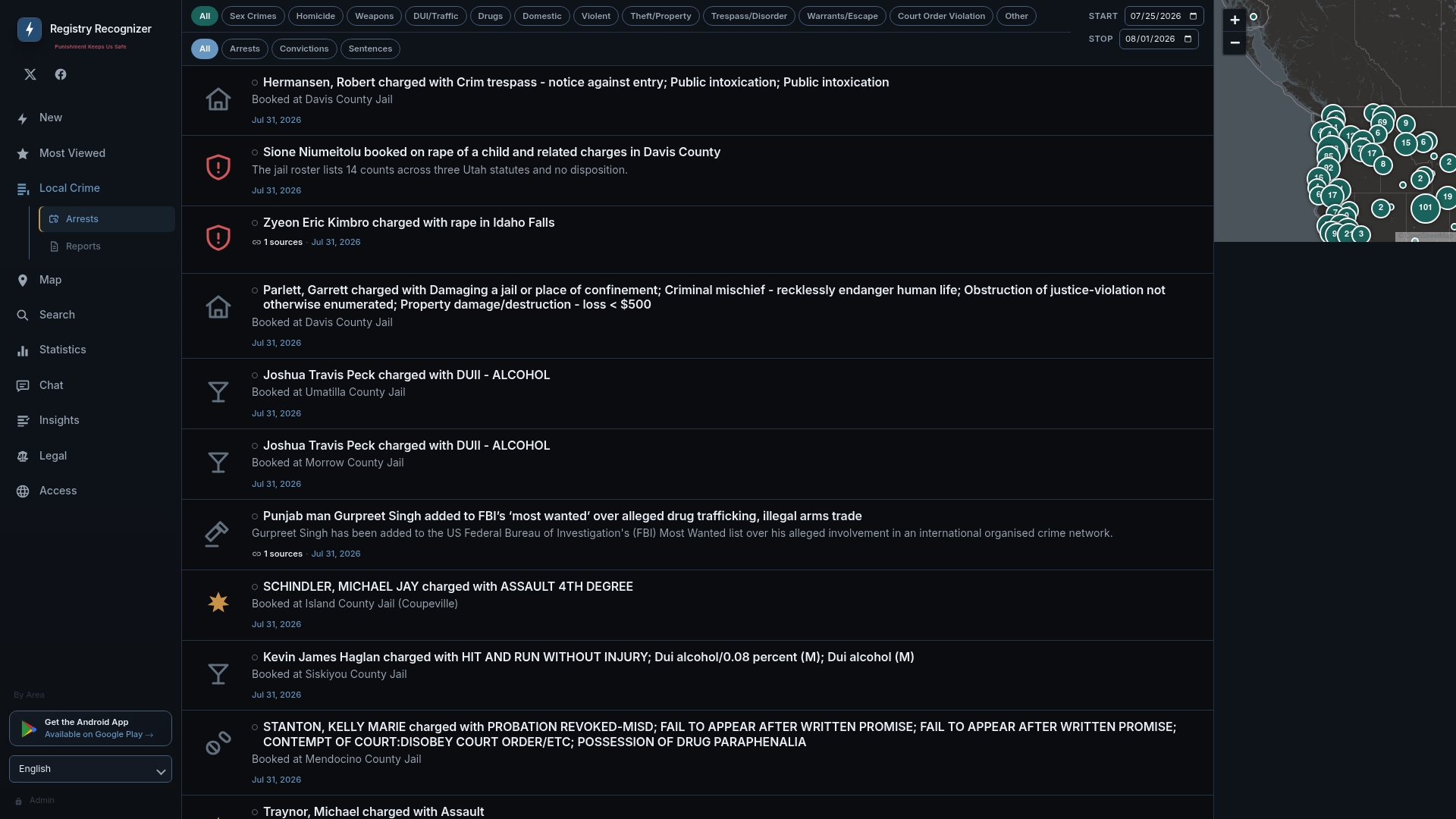
What you get in one search:
- Booking details including charges, arrest date, and bond status
- Mugshots and custody status where available from source records
- Filtering by crime type, county, and offense category
- Links back to the originating official source for verification
A recent felony probation violation record on the site shows exactly how charges, booking dates, and bond status display in a single view. Certified documents still need to come from the Clerk of Superior Court or the Sheriff's records unit. Registryrecognizer is for research, background awareness, and convenience.
Start your search at Registryrecognizer to check Maricopa County arrests alongside records from other counties in one place.
Sources
These are the portals to open first, with a one-line reason each earns that spot.
- InmateInfo - Maricopa County Sheriff's Office
- Criminal Department | Maricopa County Superior Court
- Public Access Case Lookup
- Inmate Data Search
For any record that will be used in a legal proceeding, employment decision, or official filing, verify through phone or request a certified copy from the Clerk of Superior Court. Online portal data is informational; certified records are authoritative.