
The fastest way to find recent arrests in Los Angeles County is to search the LASD Booking Log directly online, then call the 24-hour Inmate Information Center at (213) 473-6100 to confirm anything time-sensitive. The Booking Log lets you filter by station and date range across the county jail system, and it's updated far more often than any third-party site. For a name search rather than a station browse, the LASD Inmate Information Center portal is your next stop.
- Search by last name and first name on the Inmate Information Center portal.
- Filter the Booking Log by station and date if you know roughly where the arrest happened.
- Call 213-473-6100 to verify custody status in real time, especially for anything within the last two hours.
Bookings made in the past two hours often won't show up online yet. If the clock matters, the phone line beats the website every time.
Key Takeaways
Finding a recent arrest in Los Angeles County means starting with LASD's own tools and confirming anything urgent by phone, not by refreshing a webpage.
| Point | Details |
|---|---|
| Call first for urgent cases | Dial 213-473-6100 for real-time custody confirmation, especially within the two-hour posting lag. |
| Match the tool to the task | Use the Inmate Information Center for name searches, the Booking Log for station and date browsing. |
| Know the arresting agency | LAPD bookings route to LAPD facilities like the Metropolitan Detention Center, not LASD jails. |
| Certified copies require an appointment | Contact the Records & ID Bureau for proof of incarceration or official documentation. |
| Aggregators speed up broad searches | Registryrecognizer's filterable roster is a fast starting point, but confirm critical details with LASD or LAPD directly. |
This article is general information, not a substitute for advice from a qualified lawyer. Consult a qualified legal professional about your own circumstances before acting on anything here.
Table of Contents
- Official LASD Tools to Check First: Booking Log and Inmate Information Center
- Other Official Agencies to Check: LAPD Jails and City Departments
- Step-by-Step Checklist for Searching Recent Arrests
- What Booking and Inmate Records Usually Include
- Why Records Can Be Incomplete or Delayed
- Third-Party Databases vs. Official Sources: Where Each Fits
- How to Request Certified Arrest Records or Booking Logs
- Sources
Official LASD Tools to Check First: Booking Log and Inmate Information Center
Two LASD systems handle almost every general search for recent arrests in the county, and they're built for different jobs.
The Booking Log portal is designed for scanning activity at a specific station over a date range. It's the tool journalists and researchers lean on, and some professional or bulk uses require a signed Booking Information Declaration before you get full access. The Inmate Information Center is built for a targeted name lookup: you search a specific person and get back booking number, facility, booking date, and arresting agency, once you clear a reCAPTCHA check.
Using the Booking Log:
- Select the sheriff's station you want to check.
- Set a date range (start narrow, then widen if you get nothing).
- Scan the entries for the name, charge type, or booking date you need.
Using the Inmate Information Center:
- Enter last name and first name (partial names sometimes work better than full ones).
- Solve the reCAPTCHA prompt.
- Review the booking number, facility, and arresting agency listed on the result.
Pro Tip: If a name search comes back empty, don't assume the person wasn't booked. It usually means the record is inside that two-hour blackout window. Call the inmate line instead of refreshing the page.
Other Official Agencies to Check: LAPD Jails and City Departments
Not every arrest in the county runs through LASD. Someone taken into custody by Los Angeles police lands in an LAPD-operated facility instead, and that changes who you need to call.
- LAPD runs its own custody sites, including the Metropolitan Detention Center, the 77th Street Regional Jail, and Valley-area facilities like Van Nuys.
- Many smaller city police departments within the county still book arrestees into LASD custody, so check that department's own booking desk first if you're unsure.
- Arraignment location depends on the arresting agency and the charge, so when in doubt, call the holding facility directly rather than guessing.
Knowing who made the arrest, LAPD or LASD, saves more time than any search filter. It tells you which phone number to dial first.
Step-by-Step Checklist for Searching Recent Arrests
Work through these steps in order, and most searches resolve in under five minutes.
- Enter last name and first name in the Inmate Information Center.
- Add a date of birth or approximate age if the name returns multiple matches.
- Search by booking number instead, if you have one, since it's the most precise identifier.
- Switch to the Booking Log and filter by station and date range if the name search comes up empty.
Expect result fields like name, booking number, facility, arresting agency, charges, and bail or hold status. If nothing turns up:
- Wait two hours and try again, since fresh bookings take time to post.
- Try name variations: nicknames, middle names, or initials.
- Confirm the reCAPTCHA actually cleared before assuming the search failed.
- Call 213-473-6100 if the name still won't surface.
Escalate to the Records & ID Bureau or the specific facility when you need a court date confirmed, a medical issue clarified, or an identity question resolved that the online portal can't answer.
What Booking and Inmate Records Usually Include
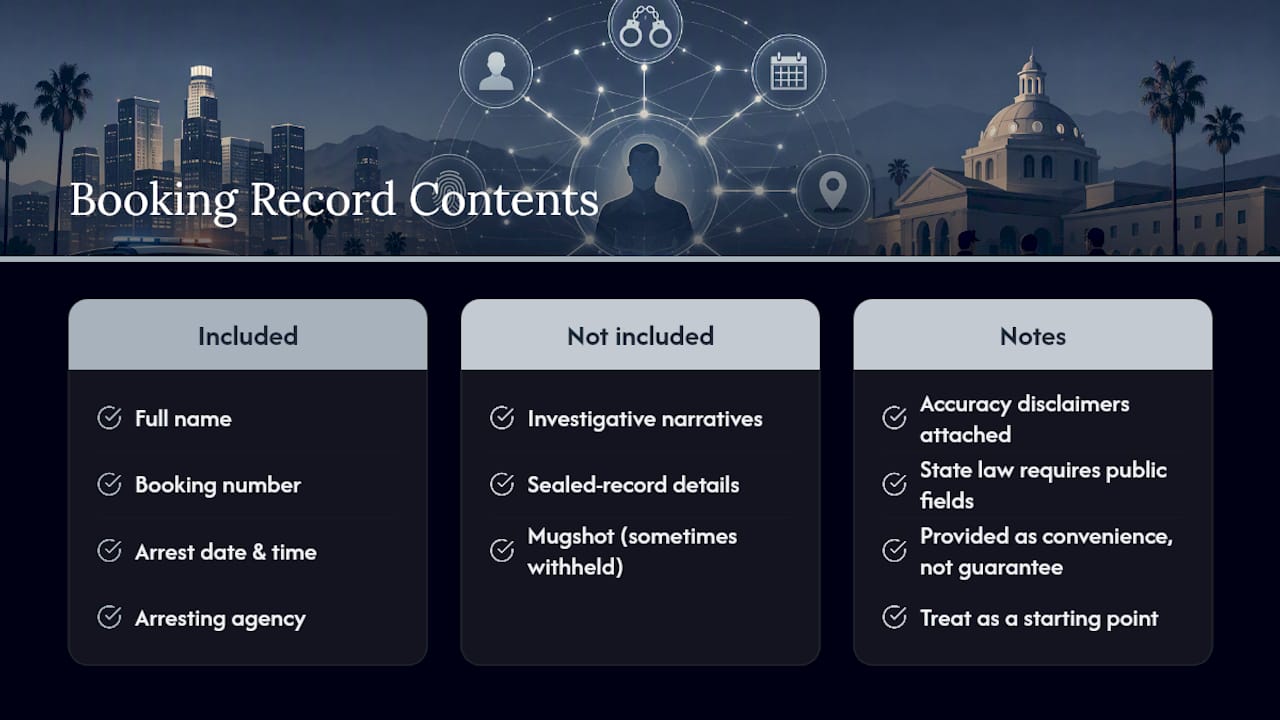
A standard booking record typically shows full name, booking number, arrest date and time, arresting agency, facility, basic charges, bail or hold status, and a next court date when one's been set. California law requires counties to make specific categories of arrest information public, which is exactly why these fields appear on booking logs statewide.
What you won't get: investigative narratives, sealed record details, and, in some cases, a mugshot. Agencies also attach accuracy disclaimers to these online displays.
The county provides these tools as a convenience, not a guarantee. Treat anything you read online as a starting point, not a final answer, especially before you repeat it to someone else.
Why Records Can Be Incomplete or Delayed
Two mechanical reasons explain most of the gaps readers run into. First, LASD systems generally won't show a booking that happened in the last two hours. Second, reCAPTCHA exists specifically to block automated scraping, which also means some workflows and third-party tools lag behind live data.
- Call 213-473-6100 for real-time custody confirmation.
- Contact the specific holding facility for details the online portal doesn't show.
- Request formal documentation from the Records & ID Bureau when you need something certified.
Pro Tip: For anything tied to a court date or a medical concern, get the answer on the phone and, if possible, in writing. A screenshot of a booking log entry doesn't hold up the way a certified record does.
The reCAPTCHA isn't there to slow down honest searches. It's there to stop bulk scraping, and that's also why some aggregator sites run a step behind LASD's own data.
Third-Party Databases vs. Official Sources: Where Each Fits
Third-party arrest databases trade some data freshness for a much easier search experience. Official LASD and LAPD tools are the system of record, but they're not always fast to browse, especially if you're checking multiple names or don't know which station handled the booking.
The trade-off is real. Aggregator sites usually offer cleaner search interfaces, filters by charge type, and mugshots when available, but because LASD's own anti-scraping protections limit automated updates, most aggregators refresh less often than the live Booking Log. That's not a flaw specific to any one site. It's a structural result of how the county protects its data.
Registryrecognizer works as a searchable roster across counties, with filters for charge type and jail location that make browsing faster than clicking through station-by-station Booking Log entries one at a time. It's a genuinely useful starting point for a broad search, particularly when you're not sure which agency or jail to check first.
- Faster browsing and better filtering: aggregator advantage.
- Guaranteed real-time accuracy for a specific custody question: official source advantage.
Use an aggregator to find where to look. Use the phone line to confirm what you found.
For anything that affects a legal decision, a safety concern, or a court date, cross-check the result against LASD, LAPD, or a call to 213-473-6100 before you act on it.
How to Request Certified Arrest Records or Booking Logs
For official documentation, not just a quick look, the Records & Identification Bureau is the office that handles certified copies and proof-of-incarceration requests. Appointments are typically required, and staff can tell you what identification to bring.
- Contact the Records & ID Bureau through LASD's official site to confirm current hours and appointment requirements.
- Ask specifically for a certified copy or proof of incarceration if that's what you need for a legal or employment matter.
- If you need Booking Log access for professional or investigative use, submit the required Booking Information Declaration.
- Bring photo identification and any case or booking number you already have.
- Expect appointment-based service rather than a same-day walk-in guarantee.
Search Smarter: Registryrecognizer's Fast Arrest Lookup
Registryrecognizer gets you to a specific record faster than clicking through station-by-station booking logs, especially when you don't yet know which jail or agency to check. The site's searchable roster lets you filter by charge type and location instead of guessing which of dozens of LASD stations to browse first.
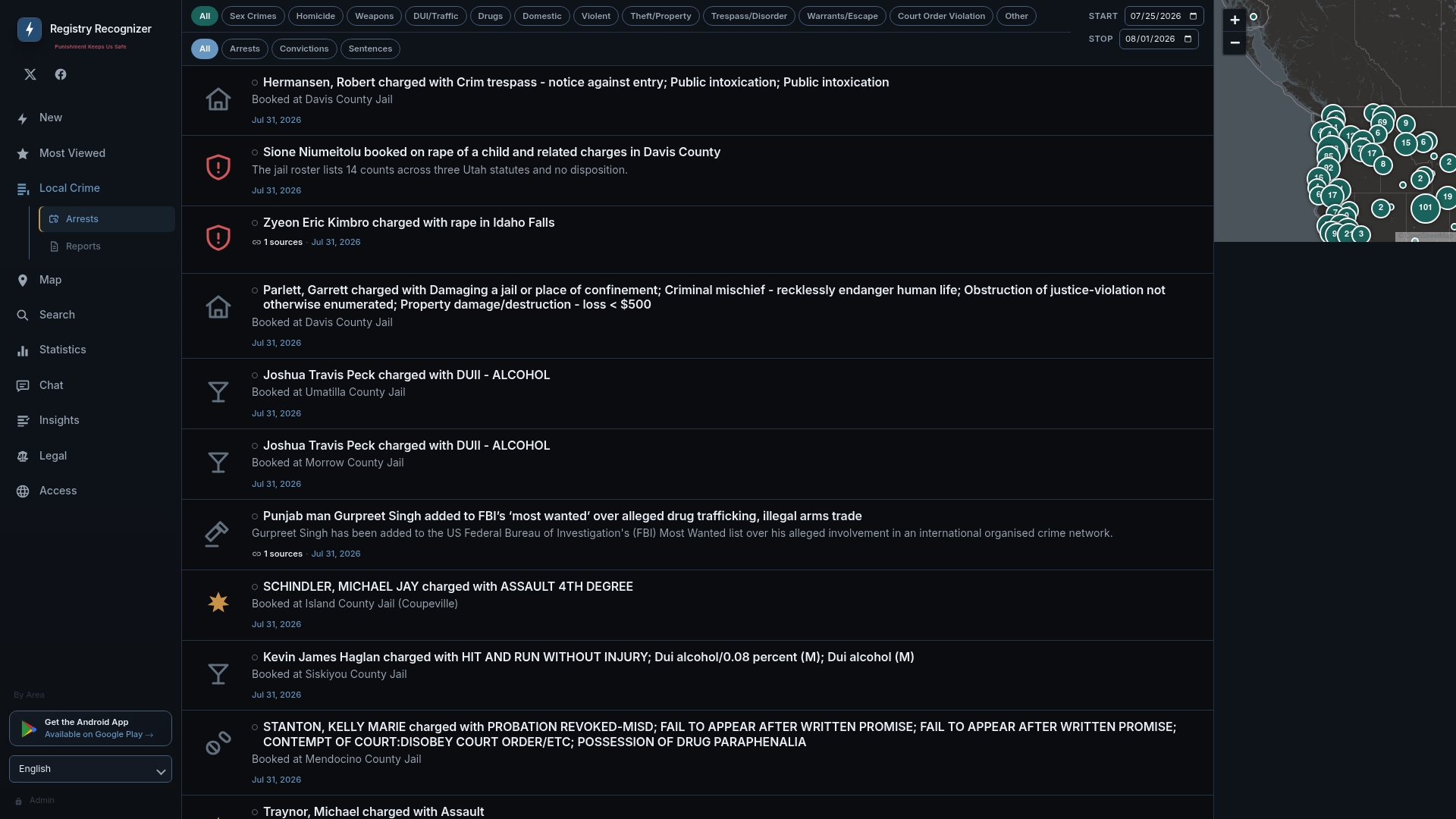
You can see the format in action on records like this recent booking entry, which lays out charges, booking details, and jail location in one place. Still, for anything tied to a legal deadline, a safety concern, or custody status you need to rely on, confirm it directly with LASD, LAPD, or the 24-hour inmate line at 213-473-6100. Start your search on Registryrecognizer now, and treat the phone call as your final check, not an afterthought.
Sources
Start with LASD and LAPD tools for accuracy, and use Registryrecognizer when you need to browse quickly across counties. Never use booking data to harass, solicit, or target someone who's been arrested. That's not what public records are for.
- Booking Log Home - BOOKING LOG
- Jail and Custody Information - LAPD Online
- California Government Code §7923.610
- Los Angeles County Sheriff's Department - LASD
Recommended
- Dangelo Sanchez charged with PC 3455(A) - VIOLATION OF POST RELEASE SUPERVISION · Registry Recognizer
- Freddy Lopez Molina charged with PC 29800(A)(1) - POSSESSION OF FIREARM BY A FELON (OLD CODE 12021(A)(1) · Registry Recognizer
- Murder suspect Jayden V. Cayou arrested in Marinette, WI · Registry Recognizer