
Solving a common name search comes down to three moves: build an identifier profile before you type anything into a database, run that profile against the right record sources, and confirm every candidate with at least two independent identifiers, never one. Two filters do most of the work immediately: date of birth and city or county. If a record doesn't match on both, it's not your subject yet. Registry Recognizer and author Sean's tutorials cover the rest of the workflow below.
TL;DR:
- Confirm matches by cross-referencing at least two independent identifiers, such as date of birth plus a case number, rather than relying on a single detail.
- Use shared identifiers like previous addresses, phone numbers, and employer details, combined with lawfully obtainable data sources, to refine searches without requesting sensitive information.
- Always document and verify each record by saving URLs, case numbers, and specifics of matched fields, especially when only one identifier initially appears to match.
- Rely on filtered databases like Registry Recognizer with county and birth year filters to generate relevant candidates quickly and accurately.
- Avoid interpreting name-only hits as reliable; instead, treat them as leads requiring confirmation with at least two matching identifiers before proceeding.
Table of Contents
- What counts as a real identifier in a common name search
- The two-identifier rule for confirming a match
- When identifiers are missing: your legal next steps
- How Registry Recognizer and our tutorials speed verification
- A records researcher's honest take on name-only hits
- Search smarter with Registry Recognizer's filtered database
- Sources
What counts as a real identifier in a common name search
Not every detail you know about a person carries the same weight once you start a name directory lookup. Investigators split identifiers into two tiers, and confusing the two is the single fastest way to misidentify someone.
Unique identifiers point to exactly one person: a Social Security number, a driver's license number, a state ID number, or a criminal justice system ID like a SID number. You will rarely get to search by these directly in public-facing databases, and you shouldn't be asking anyone to hand them over. Shared identifiers narrow the field without pinpointing anyone alone: date of birth, home address, phone number, employer, or a middle name. Public record searching mostly runs on shared identifiers stacked together, and guidance on identifier matching from the background screening industry backs exactly that approach: combine enough shared identifiers and you get functional uniqueness even without a Social Security number.
Before you search anything, gather what you can lawfully collect:
- Date of birth or at minimum a birth year and age range
- Middle name or middle initial
- Last known city or county of residence
- Prior addresses, especially if the subject moved in the past five to ten years
- Phone number or employer, which often surface in public filings or professional licensing records
- Names of relatives, which help you cross-reference family listings and shared addresses
You can pull a lot of this from public sources without ever requesting sensitive data: professional licensing boards, property tax records, LinkedIn profiles, and court filings all leak city, employer, and age-range details. Research on tracking people with common names makes the case for building this kind of context-rich profile, residence, occupation, timeline, before you ever touch a search bar.
Pro Tip: Search "John Smith" alone in most county systems and you'll get dozens or hundreds of hits. Add a birth year and a county, and that list often collapses to one or two names. The name-only search guide puts it plainly: expect to need one or two extra disambiguators to go from hundreds of results to a handful.
The two-identifier rule for confirming a match
One matching identifier is a lead. Two independent matching identifiers is a confirmation. That distinction is the entire discipline of verification, and it's where most amateur searches go wrong.
Acceptable confirmation pairs look like this: date of birth plus a prior address, date of birth plus a mugshot that visually matches a known photo, or a case number plus a current address. Weak identifiers, standing alone, don't count: a name match with no DOB, or an age range without anything else, isn't confirmation. It's still a candidate.
State court guidance from Wisconsin's Department of Justice warns explicitly that name-based checks, even ones that include a DOB match, can still return someone else's record. The state's own advice is to compare every identifying data field on the record against what you already know before you treat a hit as confirmed.
When you find a plausible match, document it properly:
- Save the source URL for every record you're relying on
- Record the case number or booking number exactly as listed
- Note which specific fields matched (DOB, address, mugshot) and which didn't
- Flag any residual uncertainty rather than rounding it up to "confirmed"
Roughly one identifier match alone tells you almost nothing reliable about ownership of a common name, which is why investigator playbooks for common-name cases treat two-identifier confirmation as the floor, not a best practice. Stop and escalate if you're stuck between two equally plausible candidates, if the record is sealed or restricted, or if your use case touches FCRA-covered decisions like employment or tenant screening.
When identifiers are missing: your legal next steps
Sometimes you genuinely don't have enough to confirm anything, and that's a signal to slow down, not to guess. A few lawful paths forward exist.
- Expand your address-history search by checking property records or voter registration data tied to the name.
- Check professional licensing boards, which often list employer and city even when court records don't.
- Try a reverse phone or email lookup if you have a partial contact detail already.
- Consider a licensed paid background-check service to generate candidates faster, understanding that it still requires primary-source confirmation before you act on anything.
Never request a Social Security number to close the gap, and stay aware of limits under the Driver's Privacy Protection Act and the Fair Credit Reporting Act, particularly if your search feeds into a hiring, housing, or lending decision. Paid database guidance is clear that these services speed up candidate generation, not verification. Document your uncertainty honestly, and don't publish or act on a name-only hit you couldn't confirm.
How Registry Recognizer and our tutorials speed verification
Registry Recognizer pulls county arrest rosters, booking details, mugshots, charges, and jail locations into one filterable database, and those fields map directly onto the identifier profile you built earlier. A birth year, a county, and a last name are usually enough to start narrowing results the moment you search.
A typical workflow looks like this: filter by county and approximate date of birth, pull up the booking photo and case number on a matching record, then cross-check that case number against the county court docket to confirm it's the same filing. Two systems, two identifiers, one confirmed match.
A few tutorials help with the operational details:
- Look up criminal charges using official court records once you have a case number
- Find mugshots through public booking systems for visual confirmation
- Understand case number formats so you can match records across systems correctly
| Verification step | What Registry Recognizer provides |
|---|---|
| Initial filter | County + approximate DOB narrowing |
| Visual check | Booking mugshot for candidate comparison |
| Cross-reference anchor | Case number tied to county docket |
| Documentation | Direct record URL for source tracking |
A records researcher's honest take on name-only hits
Name-only hits feel like answers. They're not. I've seen searches confidently pin the wrong "Michael Rodriguez" to a decade-old charge simply because nobody checked a birth year. The fix isn't more searching, it's slower confirming.
Treat every name-only match as a lead worth investigating, never a fact worth repeating, until two identifiers agree and you've written down exactly where each one came from.
— Sean
Search smarter with Registry Recognizer's filtered database
Generic search engines make you dig through unrelated news articles and outdated forum posts just to find a booking record. Registry Recognizer skips that entirely by giving you county-level filters, current mugshots, and case numbers in one searchable interface built specifically for this kind of lookup.

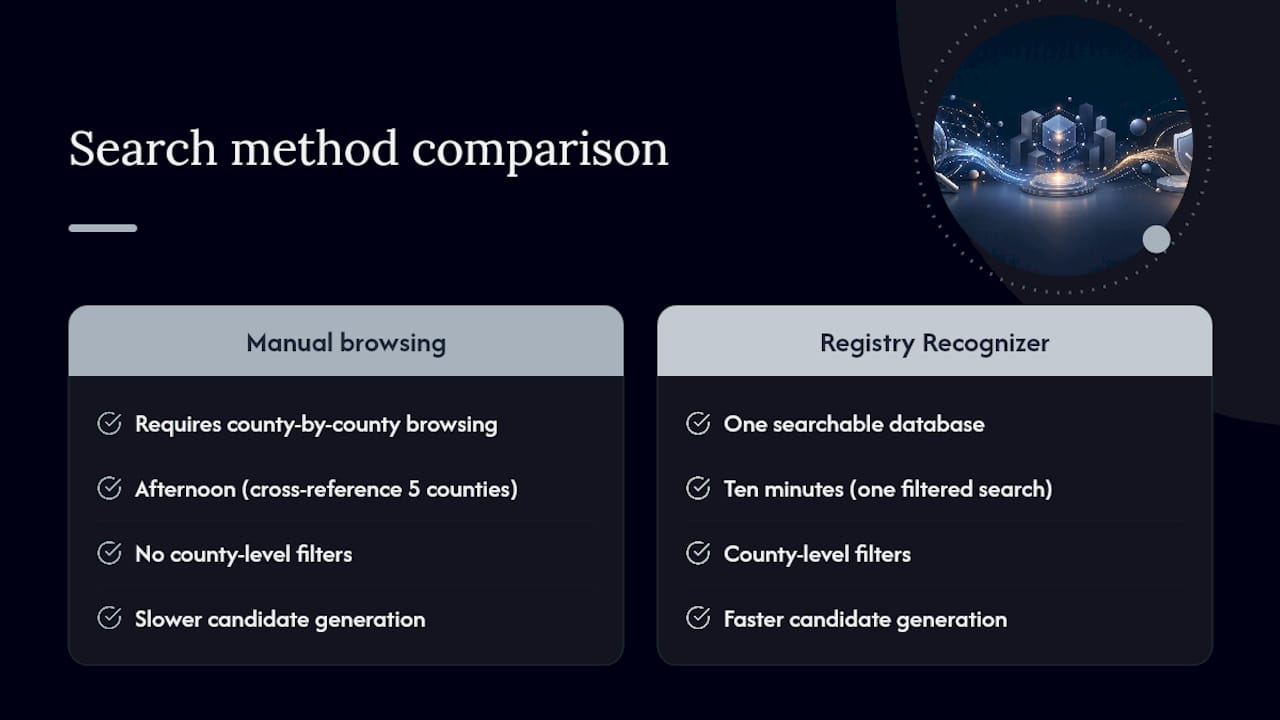
You get faster candidate generation than manual county-by-county browsing, filters that let you combine name with location and approximate age immediately, and direct links to the specific booking record you need for documentation. That's the difference between spending an afternoon cross-referencing five county websites and spending ten minutes on one search.
Start with the Registry Recognizer database and run your first filtered search using the county and date-of-birth combination covered above. If you want to see what a fully detailed record looks like before you start, this sample booking record shows the identifier fields you'll be working with, booking date, charges, and jail location included.
This article is general information, not a substitute for advice from a qualified lawyer. Consult a qualified legal professional about your own circumstances before acting on anything here.
Sources
A common name search is only as good as where you point it. Different systems index different things, and running the wrong search in the wrong system wastes time you don't have.
- Criminal Record Information Identifier Matching (PBSA guidance)
- How to research people with common names (The Ancestor Hunt)
- Reading a criminal record (Wisconsin DOJ)
- How to find someone with just a name (2026 Guide)
Search only the jurisdictions tied to your subject's actual address history rather than running the same name through every county in the state. Fragmentation across record systems means most databases are county-specific and name-based by design, so a scattershot approach burns hours without adding accuracy.
Watch for name variants, too. Nicknames, maiden names, hyphenated surnames, and middle-initial-only listings all fracture what should be one person's record trail across multiple entries. Search the legal name first, then run one pass with the most likely nickname or alias before you widen further. Widening too early is how false positives pile up.